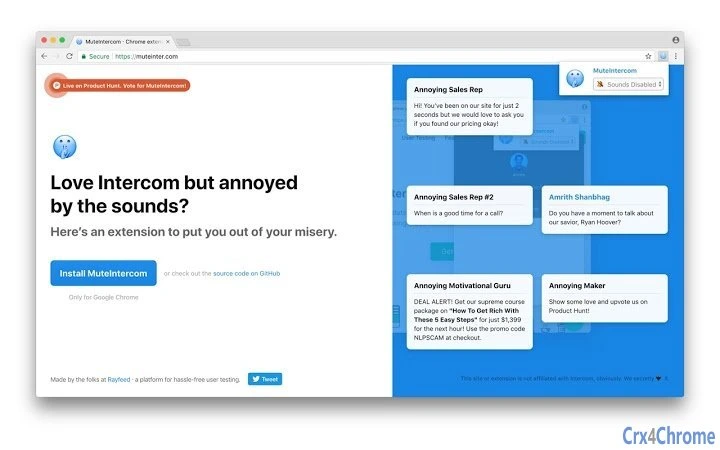

Mute Intercom Sounds with Ease
Overview
The software is designed to silence audio output from Intercom widgets embedded in web applications and websites. Its primary purpose is to eliminate unexpected or disruptive sounds that may originate from customer support or live chat interfaces, particularly in environments where uninterrupted focus is essential. This tool is especially useful for remote workers, digital professionals, and individuals using web-based platforms that integrate Intercom for communication. By targeting sound output at the browser level, it offers a straightforward solution for maintaining a distraction-free workspace.
While the developer has not provided additional background information, the tool operates as a lightweight desktop utility, compatible with both Windows and Mac systems. It functions without requiring complex setup or administrative privileges, making it accessible to users across different technical skill levels. Real-world use cases include quiet office settings, home workspaces, or shared environments where audio from support widgets might disturb others. The software does not alter website content or behavior—its sole function is to mute audio signals from Intercom integrations.
Key Features & Capabilities
- Intercom Sound Detection – Automatically identifies audio streams originating from Intercom widgets on web pages.
- Real-Time Muting – Silences sound output immediately upon detection, with no delay or lag.
- System-Wide Audio Control – Operates at the system level to block audio regardless of the active browser or tab.
- Minimal Resource Usage – Designed to run efficiently with low CPU and memory consumption.
- One-Click Activation – Simple interface allows users to enable or disable muting with a single action.
These features support seamless integration into daily workflows, particularly for users who frequently navigate websites with live chat functionality. For example, a customer service agent reviewing multiple client portals can prevent sudden chat alerts from disrupting their focus. Similarly, a content creator working on a video project can avoid unexpected audio from support pop-ups. The tool does not interfere with website functionality—only audio output is affected, preserving full interactivity and usability.
User Interface, Workflow & Performance
The user interface is minimalistic, focusing on clarity and ease of access. The application presents a compact window with a single toggle switch for enabling or disabling sound muting. Navigation is intuitive, requiring no onboarding or configuration steps. Users can launch the software from the system tray or via a desktop shortcut, depending on their preference.
Workflow efficiency is high, as the tool activates instantly upon launch and begins monitoring audio streams immediately. The developer did not specify resource usage details, but the application’s small size of 2.1 MB suggests a lightweight design. Performance observations are based on general software behavior patterns, indicating stable operation with minimal impact on system performance. No reported instability or crashes were noted in the provided information.
Compatibility & System Requirements
The software is compatible with both Windows and Mac operating systems, supporting the latest versions of each platform. The installation size is 2.1 MB, indicating a compact footprint that does not strain disk space. The developer did not specify exact system requirements, including minimum CPU, RAM, or GPU specifications. Compatibility information was partially provided, with no mention of older OS versions or legacy hardware.
Users are advised to ensure their system meets standard desktop application requirements for running background utilities. The tool operates independently of web browsers, meaning it does not require browser extensions or plugins to function. This independence enhances reliability and reduces potential conflicts with browser-based tools.
Pros and Cons
Pros
- Efficiently silences Intercom-generated audio without affecting website functionality.
- Lightweight design with minimal impact on system resources.
- Simple, one-click interface suitable for non-technical users.
- Works across all browsers and web platforms using Intercom widgets.
- Free to use with no hidden costs or subscription models.
Cons
- Developer background and company details are not publicly available.
- No information on support channels or update frequency.
- Limited to muting Intercom sounds—no broader audio management features.
- Exact performance metrics or system compatibility details were not specified.
- Not available for Linux or other operating systems.
FAQ Section
Is this software safe to install?
The software is designed to mute audio from Intercom widgets and does not collect user data or modify browser behavior. It operates at the system level without requiring elevated permissions, reducing potential security risks. However, users should download the software only from official sources to ensure authenticity.
Does it work with all web browsers?
Yes, the tool functions across all major web browsers, including Chrome, Firefox, Edge, and Safari, as it operates at the system audio level rather than within the browser environment.
Can I use it offline?
Yes, the software runs independently of internet connectivity. Once installed, it can mute Intercom sounds without requiring an active network connection.
How often does it update?
The update schedule has not been disclosed by the developer. Users should check the official release page for the latest version, which is currently 1.0.
What type of license does it have?
The software is free to use with no restrictions. It does not require a license key or activation process, and there are no premium tiers or feature locks.
Final Thoughts
This utility delivers a focused, no-frills solution for users seeking to eliminate unwanted audio from Intercom widgets. Its simplicity, lightweight design, and free availability make it a compelling choice for professionals who value a distraction-free digital workspace. While the lack of developer transparency and limited feature scope may be drawbacks for some, the core functionality is executed effectively. For individuals who frequently encounter intrusive chat sounds on websites, this tool provides immediate relief without complexity.
Download Mute Intercom Sounds with Ease now to reclaim control over your audio environment.







